
Students,
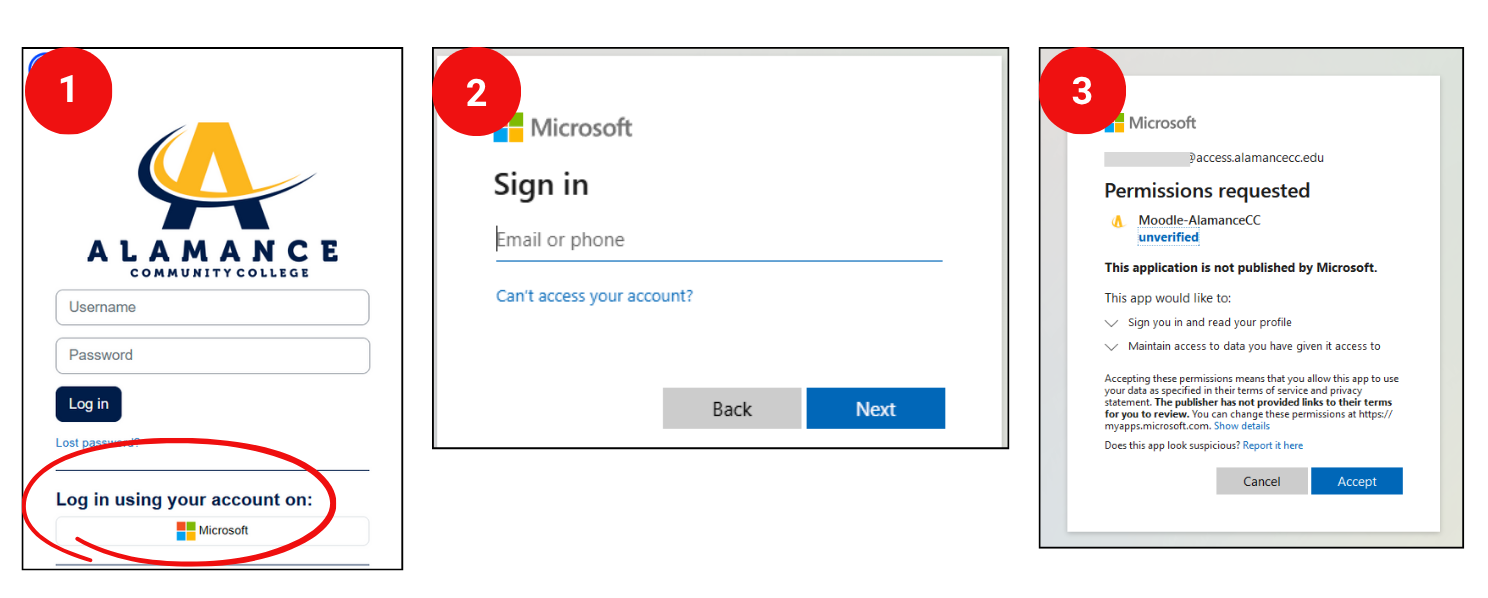
We hope you have had a great summer and look forward to you returning this fall! We have updated the login method for Moodle. The instructions and screenshots below outline the steps for logging into Moodle.
1. If you have already set up your ACC email account, click the button marked "Log in using your account on Microsoft". This will automatically login users that are already signed in with their Microsoft. If you are not signed in with your Microsoft credentials proceed to step 2.
2. Once the button is selected you will be prompted to login with your Microsoft account.
-
In the first screen put your full Alamance Community College email address including the @access.alamancecc.edu portion after your username.
-
For the password put your ACC Password. This password is the same as your ACC password that was previously used to sign in to Moodle.
-
Lastly, you may be prompted to allow Microsoft permission to log you into your Moodle account. Click on Accept to login.
If you have any questions, please contact the Distance Learning Center at distancelearning@alamancecc.edu.
Distance Learning Center